What is Google Cloud
Before any of the individual services, know what Google Cloud is: a computing platform sitting inside a wider ecosystem, delivered from Google's own global network. This page is orientation - the graded objectives start with the resource hierarchy.
The ecosystem
Google Cloud is not a walled garden. It sits inside a larger ecosystem of open-source software, partners, developers, third-party software, and other cloud providers. The same infrastructure powers Google's own products - Chrome, Google Maps, Gmail, Workspace, Analytics, and Gemini.
Google Cloud itself has three core layers: infrastructure, platform, and software - which is exactly the IaaS → PaaS → SaaS spread below.
The solution continuum (IaaS → PaaS → SaaS)
There is usually more than one way to run a workload on Google Cloud. The same app can sit anywhere along a continuum: the more you move right, the more Google manages for you and the less you operate yourself.
The further right you go, the more Google manages (servers, scaling, patching) and the less you operate - from IaaS (Compute Engine: you run the VMs) through PaaS (Cloud Run, App Engine: just ship code) to SaaS (Workspace, managed APIs: nothing to run).
Exam scenarios often accept a range of answers. Read for the constraint - "no infrastructure to manage", "full control of the OS", "scale to zero" - and pick the point on the continuum that matches it, not a favourite product.
Shared responsibility
Security in the cloud is never one party's job - it is shared between you and the cloud provider, no matter which provider you use. As you move right along the continuum above, the provider takes on more of it, but the split never disappears.
The dividing line is simple: if you configure it or store it, you are responsible for securing it. Google secures the parts of the cloud it directly controls; you secure whatever you create inside it.
- Cloud provider - hardware, networks, physical security (the parts Google directly controls).
- Customer - configurations, access policies, user data (whatever you create in the cloud).
- The boundary shifts with the service model: more managed (PaaS/SaaS) hands more to the provider, but you always own your data and access decisions.
A managed service does not make security "someone else's problem". Misconfigured IAM, public buckets, and leaked keys are customer-side failures - the provider secured the infrastructure, but you configured the access.
Global infrastructure
Everything runs on Google's own well-provisioned global network - the largest of its kind, carrying an estimated ~40% of the world's internet traffic each day. It is regions and zones connected by a private fibre-optic backbone, plus points of presence (PoPs) at the edge that bring content close to users.
- Region - an independent geographic area (e.g.
us-central1). Choose one for latency, price, compliance, and product availability. - Zone - an isolated deployment area within a region (e.g.
us-central1-a). A zone is roughly a single failure domain; spread across zones for HA. - Point of presence (PoP) - edge location on the network for caching and fast ingress; not where you run VMs.
- A region has 3 or more zones.
- Counts change constantly - never memorise the totals; check the live list.
- Zones within a region are connected by low-latency links; cross-region traffic rides Google's private backbone, not the public internet.
- 100+ edge caching nodes (PoPs) worldwide cache high-demand content close to users, so requests are served from the location with the quickest response - the highest throughput and lowest latency.
- The network spans seven major geographic areas: North America, South America, Europe, Africa, the Middle East, Asia, and Australia.
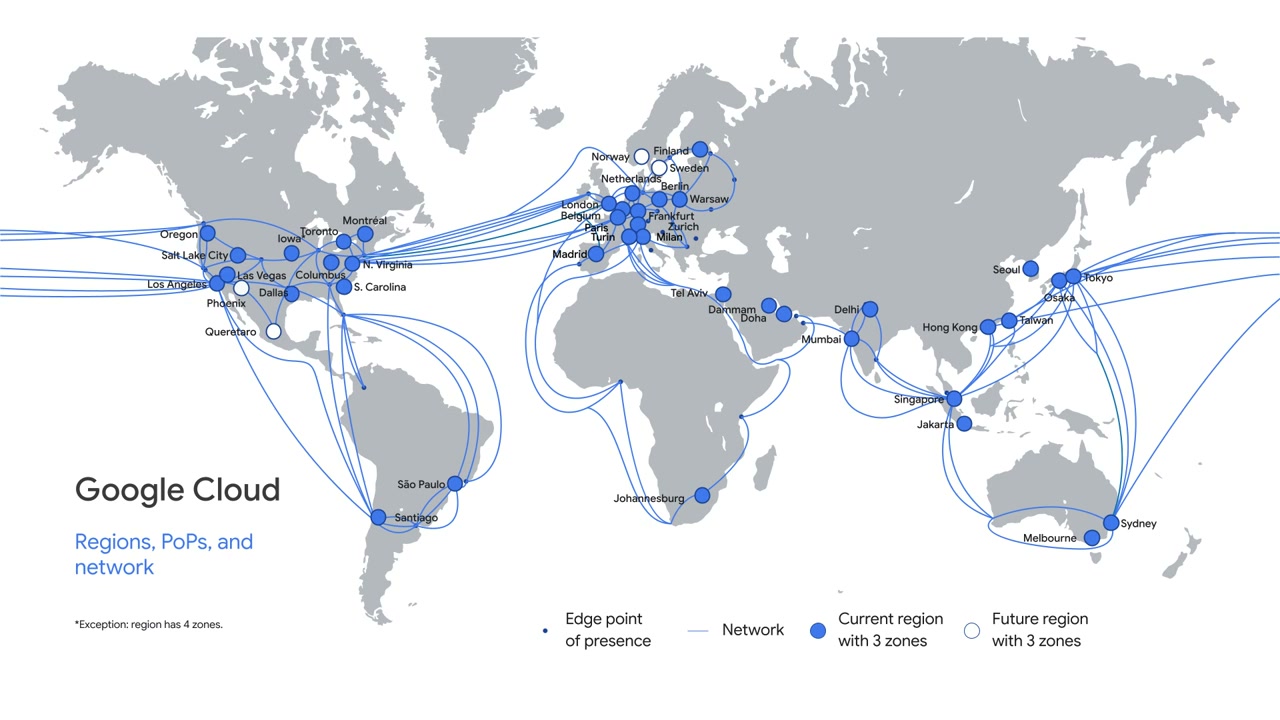
→ View the live locations map on cloud.google.com for current region/zone counts.
See regions and zones for how to actually choose a location and check per-product availability.