GPU Options
GPUs are the workhorses behind most modern AI, from image recognition to natural language processing. Their ability to run a massive number of calculations at once suits them to the compute-heavy math at the heart of machine learning. This page covers the GPU machine families on Google Cloud, how they are wired together into clusters, and which family fits which workload.
How GPUs run AI workloads
GPUs accelerate the two phases of an AI model's life:
Compute and network architecture
Before the machine types, here is the high-level compute and network architecture of the top-end A4 Ultra and A3 Ultra machines. The design is hierarchical and hyper-connected - it prioritizes high-speed communication at every level so data flows efficiently across the whole system.
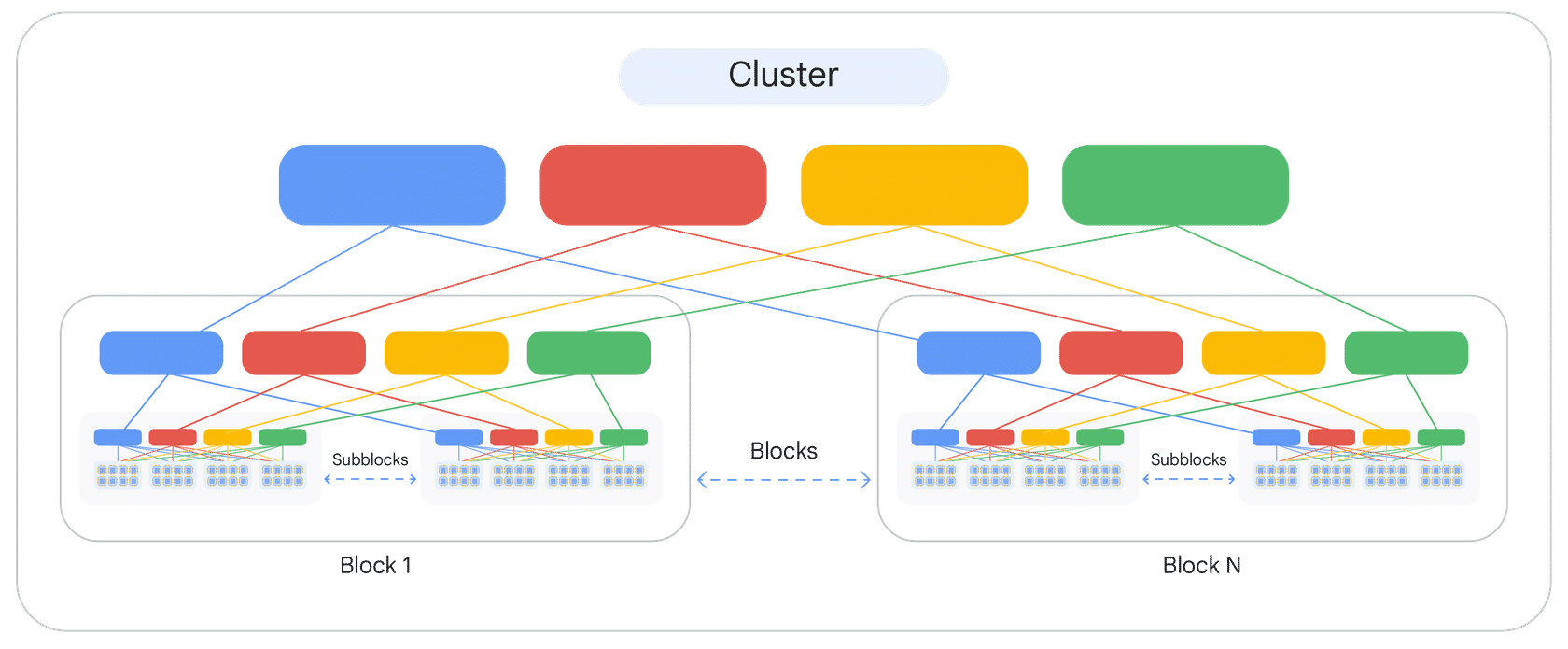
- Cluster - composed of multiple blocks, all interconnected by high-bandwidth networks.
- Block - subdivides into several subblocks.
- Subblock - contains multiple nodes.
- Node - the most granular level; typically houses multiple GPUs (the figure shows 8 GPUs per node).
- GPU communication - GPUs within a node are tightly coupled for extremely fast internal communication.
This layered, low-latency, high-bandwidth networking - from GPUs within a node up through subblocks, blocks, and the whole cluster - is what makes it possible to train the largest models, which need massive distributed compute and seamless data synchronization.
GPU machine families
Google Cloud provides GPU support across accelerator-optimized machine types (A4, A3, A2 for high performance; G2 for inference), plus the general-purpose N1 series with attachable GPUs. Each family targets a different point on the performance/cost curve.
The A3 family splits into several sub-families:
To use A4 machine types effectively, provision with Cluster Director or Spot VMs. Cluster Director reserves densely allocated machines with topology-aware scheduling: host machines are physically close, provisioned in resource blocks, and connected by a dynamic ML network fabric that minimizes network hops for the lowest latency.
Google Distributed Cloud (GDC) and specific NVIDIA software offerings (for example the NVIDIA NeMo framework) are out of scope here. Worth exploring separately for a fuller picture, but not part of this material.
Using GPU options
The predominant approach is to deploy an accelerator-optimized VM with attached GPUs (A4, A3, A2, or G2). However, some older GPUs can still be used by attaching them to an N1 general-purpose VM - the flexible path when you want a specific CPU/GPU balance or an older GPU model not offered in the A and G families.
Recap
Choosing a family comes down to the workload:
GPUs accelerate both the intensive training phase and the responsive inference phase through parallel processing. Google Cloud's GPU-accelerated families - A4, A3, A2, G2, and the flexible N1 option - are each tuned for a specific task, from foundation-model training to large-scale distributed training to cost-effective inference.
For the exam-facing angle - attaching GPUs to VMs, quota, and zonal availability - see GPUs & TPUs.