Building with GKE
Google Kubernetes Engine (GKE) is a foundational component of the AI Hypercomputer platform - it provides the orchestration, automation, and features needed to run AI/ML workloads at scale. This page walks the container-native path: containerizing an application, networking a cluster, running distributed training, and sharing GPUs efficiently.
Containerizing an AI application
Getting a model into production is complex. The most effective way to address the challenges of reproducibility and deployment is containerization - a container is a lightweight, standalone package that bundles your code with its libraries, frameworks, and configuration into a single isolated executable. It guarantees the application runs the same way everywhere, from your laptop to the cloud.
GKE modes of operation
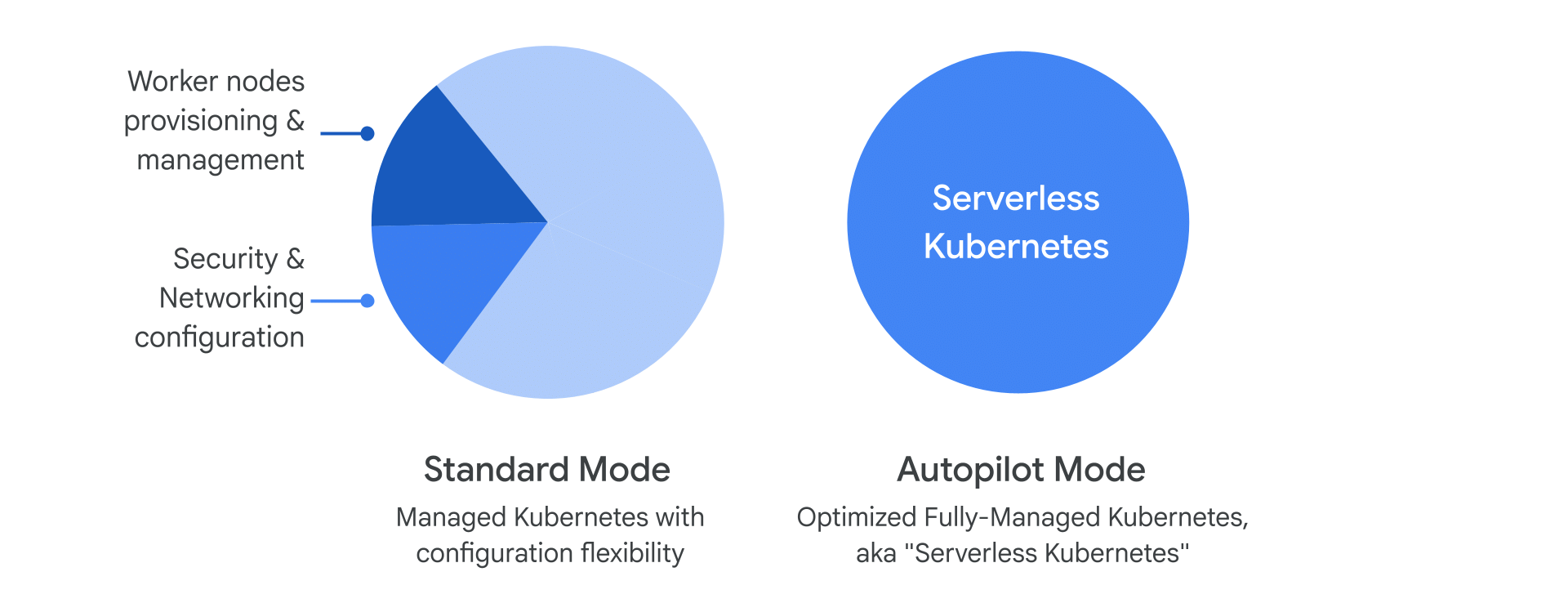
Your first major decision is choosing a GKE mode: a DIY, high-control environment or a fully managed, hands-off experience.
GKE architecture
A machine learning platform built on GKE lets multiple teams efficiently build, train, and deploy AI models using a wide range of industry-standard tools and frameworks. GKE serves as the foundation: the bottom layer provides the core compute, GPU, TPU, storage, and network resources plus the features that optimize performance, and the layers above are the software and frameworks the data science and engineering teams use.
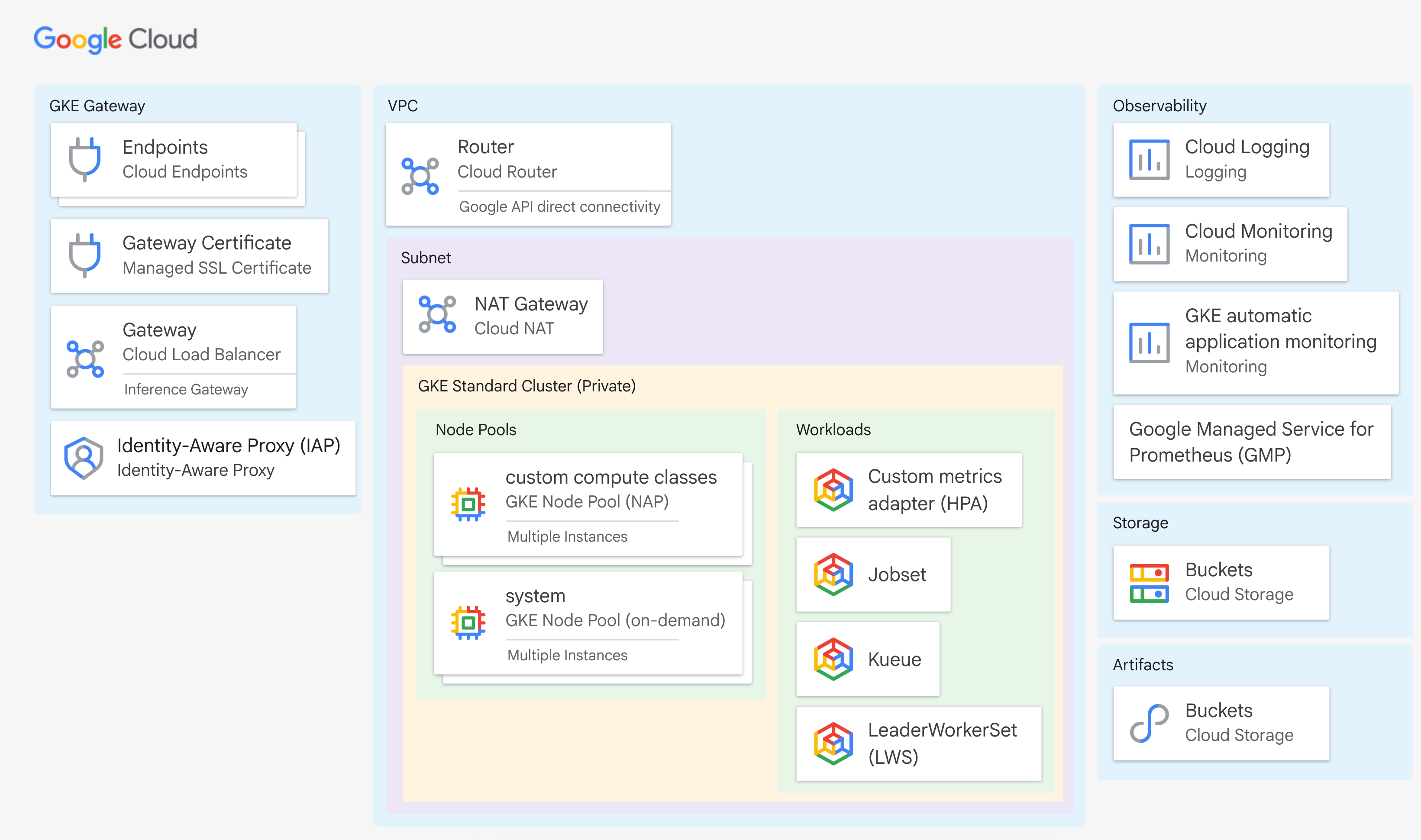
The key GKE capabilities in this stack:
- Autoscaling, placement, and provisioning - GKE scales resources, places workloads on the most suitable hardware, and provisions new nodes as needed. Node auto-provisioning (NAP) and custom compute classes (CCC) ensure the right resources at the right time - CCC lets you set fallback logic (e.g. schedule on a fast A100 GPU, fall back to an L4 if unavailable).
- Multislicing - lets a single training job use a large, contiguous block of TPUs or GPUs interconnected by a high-speed network. Critical for distributed training.
- Dynamic Workload Scheduler (Kueue) - a Kubernetes-native job queuing system that lets multiple teams share a large AI cluster fairly by managing quotas, priorities, and resource allocation.
- Distributed computing frameworks - Ray and NCCL distribute large-scale ML tasks across multiple machines.
- Workflow and data processing - Kubeflow, Spark, and Airflow manage data pipelines and orchestrate complex AI/ML workflows.
- Tools and libraries - Jupyter, TensorFlow, PyTorch, and Dask for building, training, and deploying models.
GKE node images
When you deploy a cluster, GKE builds your worker nodes using a specific node image - essentially the operating system for your nodes. GKE offers node images based on Container-Optimized OS (COS), Ubuntu, and Windows Server.
For high-performance AI/ML workloads, particularly on GKE Autopilot clusters,
use the Container-Optimized OS with containerd (cos_containerd) node image.
It is the recommended (and often required) choice because it includes:
- containerd - a lightweight, industry-standard container runtime that is more efficient than older runtimes.
- AI/ML optimizations - tuned to support the underlying hardware (like GPUs) and the high-speed networking demanding AI/ML tasks need.
For high-performance AI/ML on Autopilot, cos_containerd is the recommended and
often required node image - it ships the efficient runtime and hardware tuning
those workloads depend on. For a full comparison of node images, refer to the GKE
documentation on node images.
Networking for GKE cluster deployments
For demanding AI/ML workloads on GKE - especially those using specialized accelerators - the network configuration is crucial for performance. You have two main approaches: the default configuration from the Cluster Toolkit blueprint, or a custom configuration you set up yourself.
Approach 1: Default network configuration (Cluster Toolkit blueprint)
When you deploy an AI-optimized GKE cluster with the Cluster Toolkit blueprint (for a machine type like an A4), the network is automatically configured for optimal performance and isolation. The blueprint implements a multi-VPC environment to ensure network isolation and high-speed communication:
- Primary GKE VPC - used for the main GKE cluster components.
- Second VPC - for a second host network interface card (NIC), further isolating general traffic.
- RDMA VPC - a dedicated VPC for remote direct memory access (RDMA), which allows extremely fast, low-latency communication directly between GPUs on different nodes using the GPUDirect RDMA protocol.
The blueprint also handles several detailed configurations automatically:
Approach 2: Custom network configuration
If your workload needs more control than the blueprint offers, you can manually configure the network objects. The configuration depends on your workload type:
Enabling low-latency scaling for distributed training requires GPUDirect RDMA, and that in turn requires the multi-VPC environment to separate general traffic from the high-bandwidth GPU-to-GPU path. For step-by-step instructions, consult the "Create a custom AI-optimized GKE cluster" documentation.
Demo: serving an open-source generative AI model with GKE
This demo shows how GKE simplifies deploying and serving a large open-source model: provision a GKE cluster with NVIDIA L4 GPUs, serve the Gemma 2B LLM with the Hugging Face Text Generation Inference (TGI) toolkit, then deploy a Gradio web chat app to talk to the model.
Optimizing an AI workload
A single GPU, no matter how powerful, isn't enough - training can take weeks or months. The solution is distributed training: accelerating training by spreading the workload across multiple nodes in a cluster. It's like building a skyscraper with an army of workers each focused on a different part, instead of one architect doing everything.
Distributed training strategies
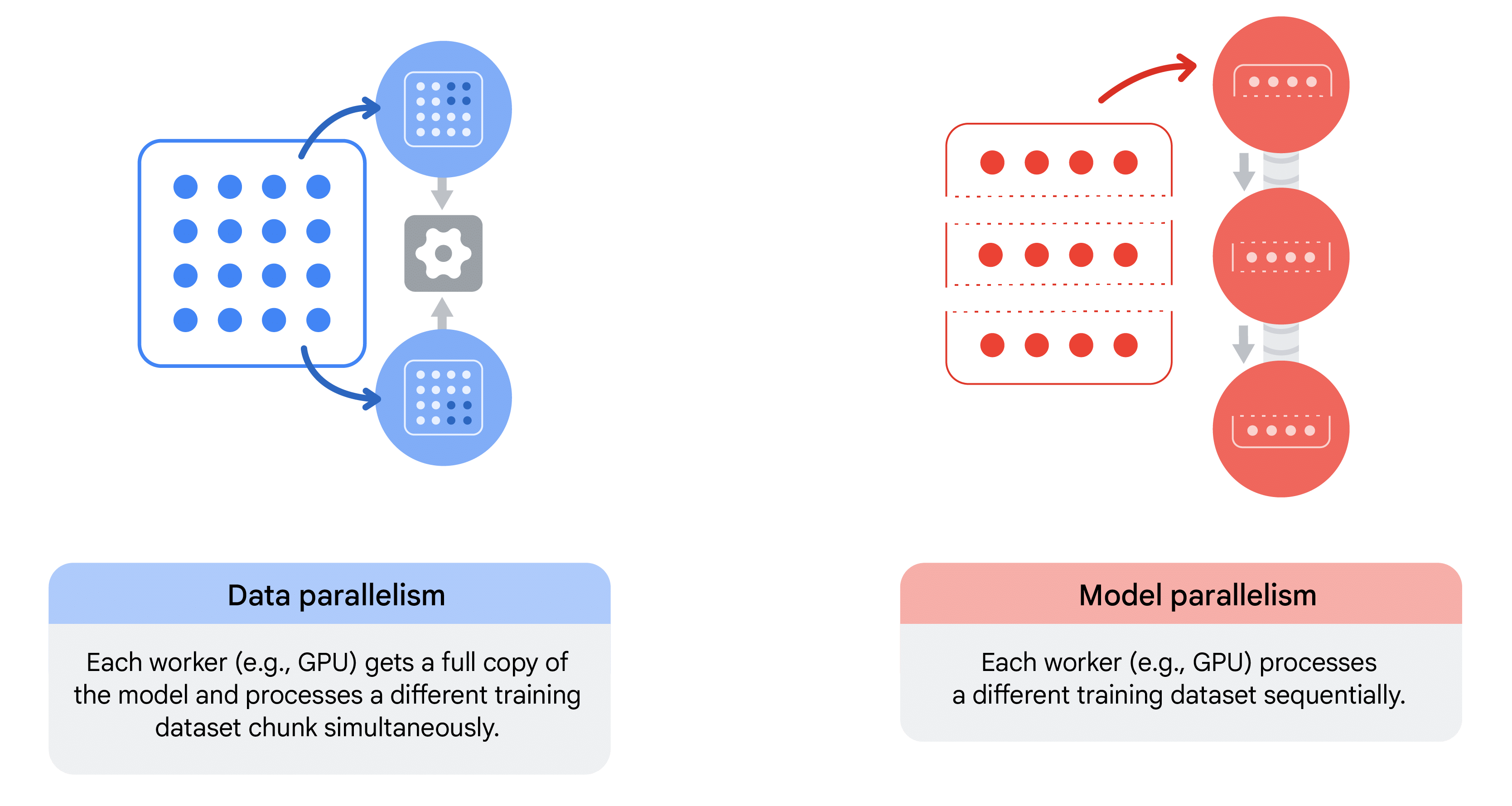
Distributed training relies on two key strategies - data parallelism and model parallelism - which can also be combined for the most massive workloads.
Distributed training on GKE
GKE is a powerful platform for distributed training because it provides the orchestration and infrastructure to support these strategies at scale. It gives you access to specialized VM families like the A3 (NVIDIA H100 GPUs) and A2 (NVIDIA A100 GPUs) built for demanding AI workloads.
- Data parallelism - the A3 family is built on a dynamic ML network fabric providing high-bandwidth, low-latency GPU-to-GPU communication, critical for synchronizing gradients.
- Model parallelism - multi-slicing lets a single training job use a large, contiguous block of TPUs or GPUs that are physically interconnected.
To run a distributed training job on GKE, follow a clear process:
- Containerize your application - package your training script and all its dependencies into a Docker container.
- Choose an orchestrator - use GKE's native capabilities or integrate an open-source tool like Kubeflow or Ray for advanced job scheduling and management.
- Define your deployment - create a Kubernetes manifest specifying the number of replicas (workers) and their resource requests (e.g. 8 NVIDIA A100 GPUs per worker). This tells the GKE scheduler to find the resources and spin up the job.
- Run the job - the orchestrator manages the full lifecycle: starting the workers, monitoring progress, and handling failures.
GPU sharing strategies
GPUs are precious and costly, so the key to cost-effective, scalable ML and HPC is
maximizing hardware utilization. By default, when a Kubernetes Pod requests a GPU
(nvidia.com/gpu), the entire physical GPU is allocated to that Pod - including
its memory - even if the container only needs a fraction of it.
That is inefficient and costly for workloads that don't need a full GPU:
- Quick, iterative AI inference tasks.
- Serving low-volume inference requests.
- Prototyping and development environments.
GPU sharing strategies let multiple containers efficiently use a single GPU, improving utilization and reducing cost.
The three main strategies
GKE offers three distinct strategies for sharing GPUs, each with different characteristics and use cases.
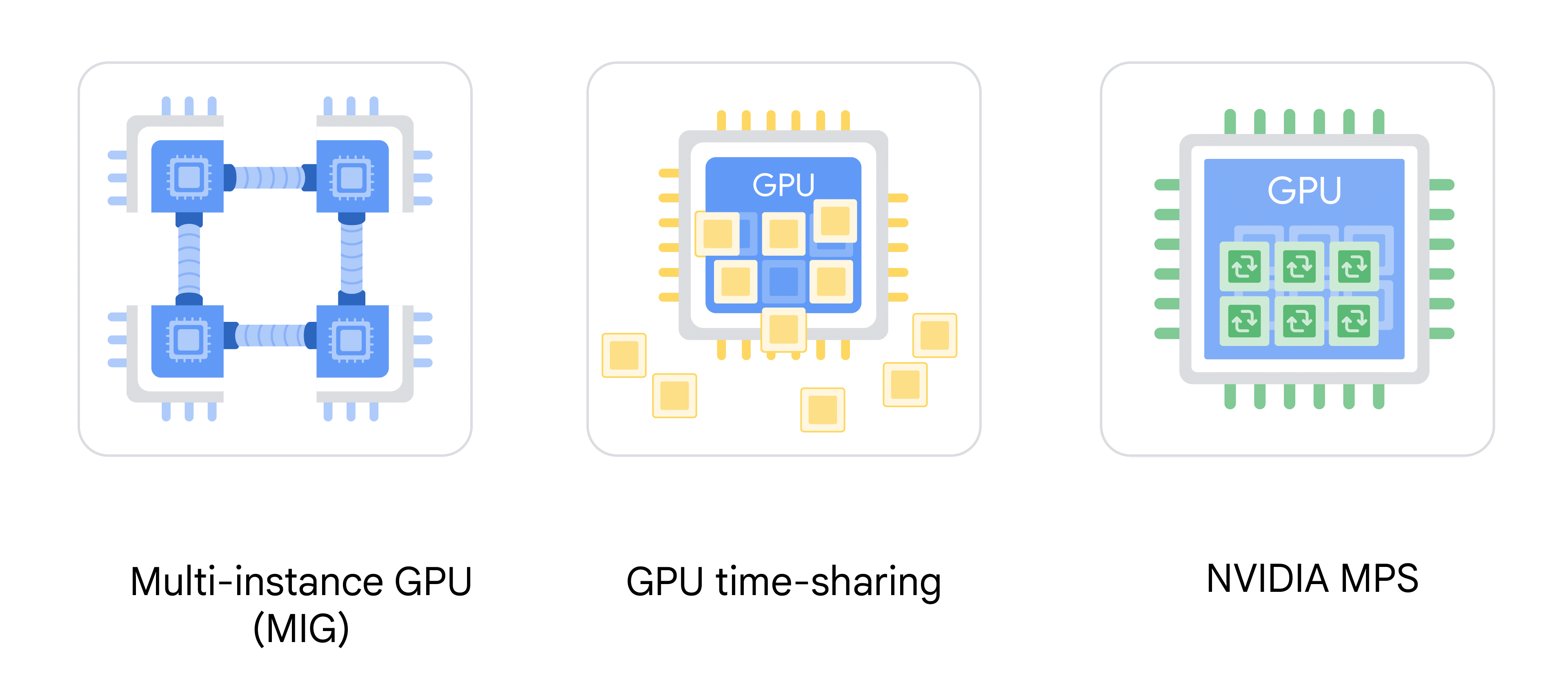
For maximum efficiency, you can combine MIG with either time-sharing or MPS - create a MIG partition, then run multiple smaller containers within it using a software-based strategy. This gives hardware-level isolation for the partition while allowing efficient multi-process utilization inside it. GKE's cluster autoscaler and node auto-provisioning then provision the correct node pools to meet your workload's requirements.
Requesting more than one GPU (nvidia.com/gpu: 2) with time-sharing or MPS will
cause GKE to reject your Pod - these strategies are designed to share a
single physical GPU among multiple workloads.
Demo: partitioning GPUs for use in GKE
This demo creates a GPU-enabled GKE Standard cluster, partitions one A100 into seven MIG slices, verifies that Kubernetes sees them as seven distinct schedulable GPUs, then deploys seven Pods - each running on its own dedicated, hardware-isolated slice.
Recap
Use the Cluster Toolkit blueprint for an automatically tuned, isolated multi-VPC network on a supported machine type. Go custom when you need manual control - a single VPC for non-distributed workloads, or a multi-VPC with GPUDirect RDMA for distributed training.