Cloud VPN
Cloud VPN securely connects an on-premises (or other-cloud) network to your VPC over an IPsec tunnel across the public internet: one gateway encrypts the traffic, the other decrypts it. Google Cloud offers two gateway types - Classic VPN (every gateway created before HA VPN existed) and HA VPN. Dynamic routes on either type are handled by Cloud Router.
Classic VPN
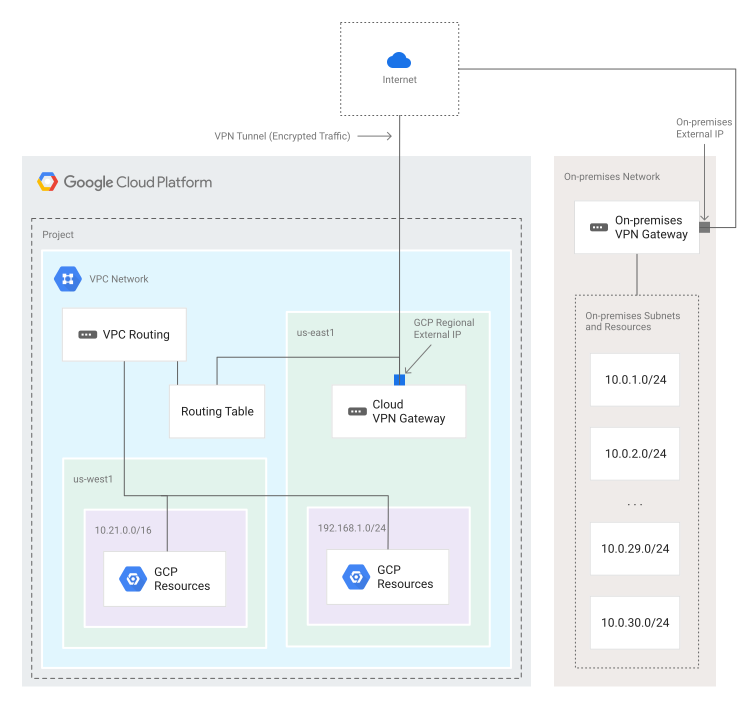
Useful for low-volume data connections. You configure a Cloud VPN gateway, a peer (on-premises) VPN gateway, and two VPN tunnels - each tunnel defines the connection from the perspective of its own gateway, and traffic only flows once the pair is up.
- 99.9% availability SLA (managed service).
- Supports site-to-site VPN, static and dynamic routes, and IKEv1 / IKEv2 ciphers.
- The Cloud VPN gateway is regional and uses a regional external IP.
- The peer gateway is a physical device in your data center, or a physical/software VPN in another cloud provider - it also has an external IP.
Classic VPN is site-to-site only. It does not support client computers "dialing in" to the VPN with client VPN software.
Because of packet encryption and encapsulation overhead, the MTU of your on-premises VPN gateway must be ≤ 1460 bytes. A larger MTU causes fragmentation/drops.
HA VPN
HA VPN is the high-availability solution: it connects on-premises to your VPC through an IPsec connection in a single region with a 99.99% SLA.
- 99.99% SLA - only when you configure two (or four) tunnels to your peer.
- The gateway has exactly two interfaces; Google Cloud auto-assigns two external IPs, one per interface, each from a unique address pool. Deleting the gateway releases the IPs for reuse.
- Each interface supports multiple tunnels, and you can create multiple HA VPN gateways.
- Tunnels must use dynamic (BGP) routing via Cloud Router.
- Route priorities decide an active/active or active/passive configuration.
You can configure an HA VPN gateway with a single active interface / one external IP, but that configuration does not qualify for the 99.99% availability SLA.
HA VPN supports site-to-site VPN in three recommended topologies, explored below.
Topology 1: HA VPN to peer VPN gateways
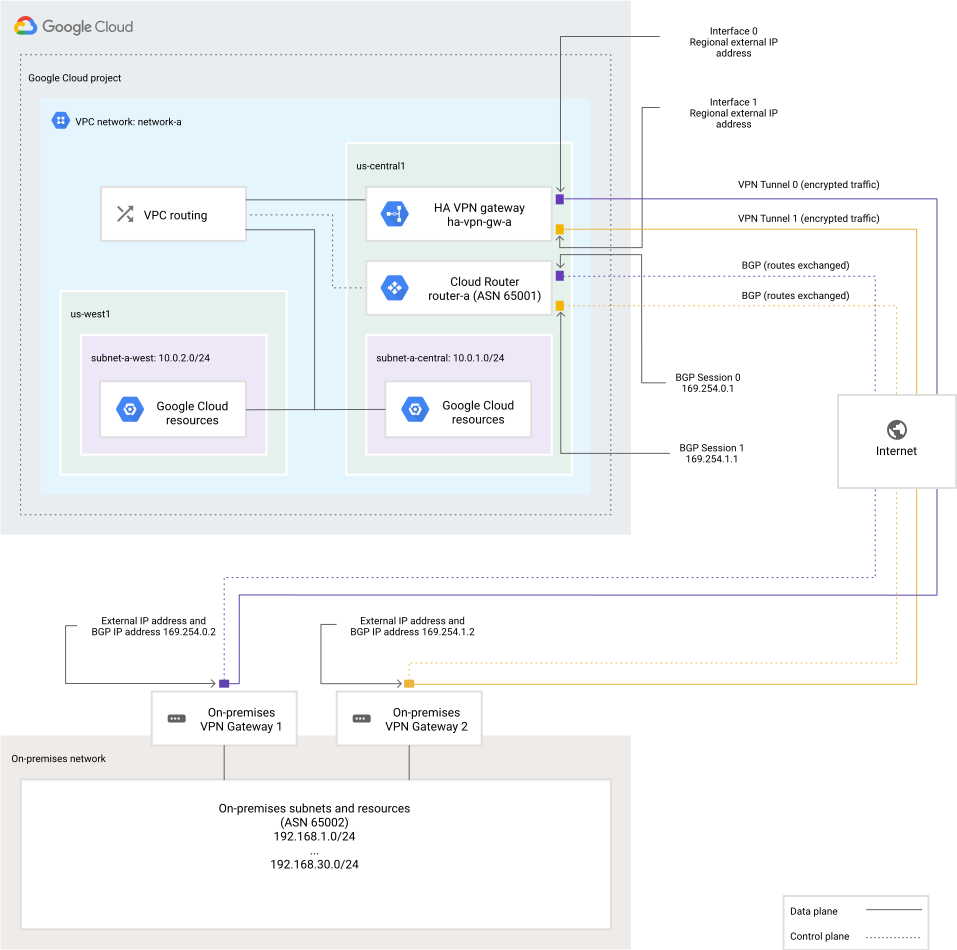
There are three peer-gateway arrangements: to two separate peer devices (each with its own IP), to one peer device with two IPs, or to one peer device with one IP. A second physical peer gateway gives you redundancy and failover - you can take one offline for maintenance and stay protected against a device failure.
The two-separate-peer-devices arrangement sets REDUNDANCY_TYPE = TWO_IPS_REDUNDANCY and delivers 99.99% availability.
Topology 2: HA VPN to AWS
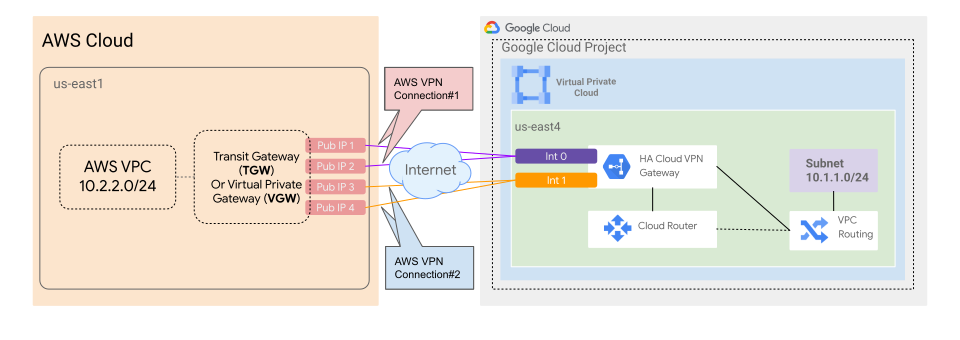
Three components: an HA VPN gateway (two interfaces) in Google Cloud, two AWS virtual private gateways, and an external VPN gateway resource in Google Cloud that describes the AWS side. The supported configuration uses four tunnels - two from each AWS VPN connection to each HA VPN interface.
You can peer with either an AWS transit gateway or a virtual private gateway, but only the transit gateway supports ECMP (equal-cost multipath), which distributes traffic equally across active tunnels.
Topology 3: HA VPN between two Google Cloud networks
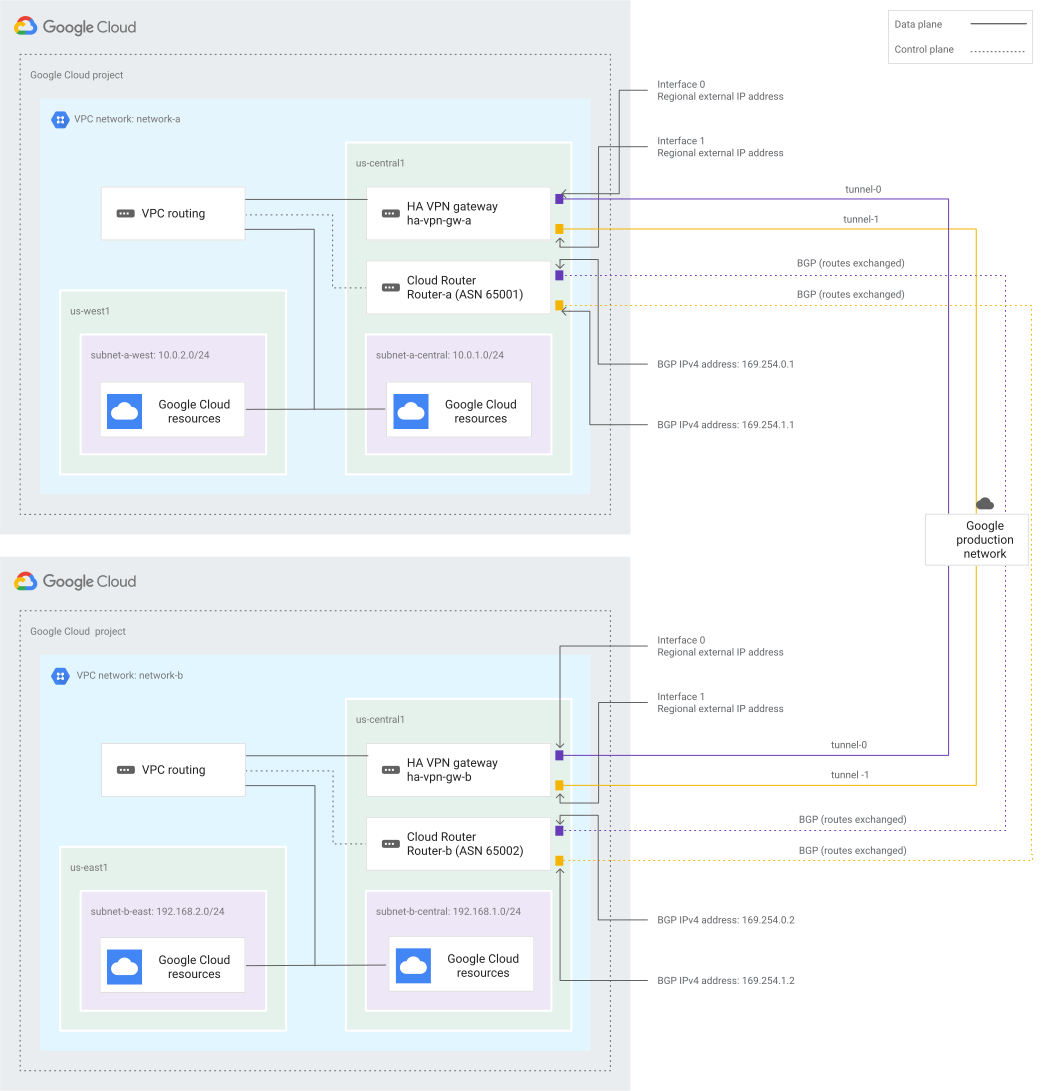
Put an HA VPN gateway in each VPC and create two tunnels per gateway: connect interface 0 to interface 0 and interface 1 to interface 1. This provides 99.99% availability.
Building an HA VPN: resource order
The lab builds this end state - a simulated on-premises VPC and a global VPC joined by HA VPN:
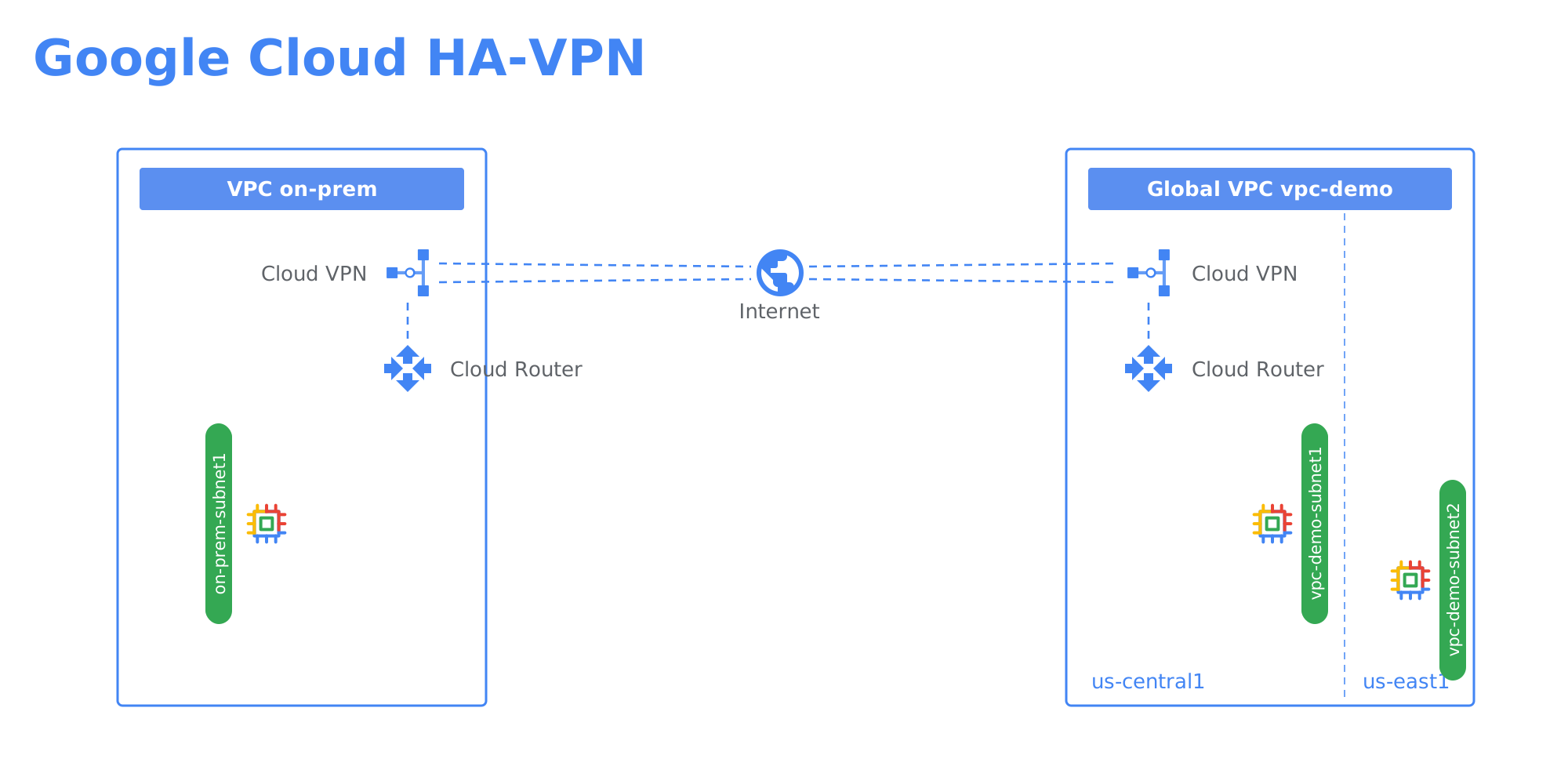
You cannot create these resources in any order - each one needs the resource above it to already exist. The diagram reads top-down: everything hangs off the VPC network, and the routing pieces stack up one prerequisite at a time.
The connectors show each resource's main prerequisite, but three resources need more than one input:
- VPN tunnel binds a gateway interface + a Cloud Router + the peer gateway (
--vpn-gateway,--router,--peer-gcp-gateway). Build two per side - interface 0 to interface 0, interface 1 to interface 1. - Router interface is added to the Cloud Router and points at a tunnel, using a link-local IP from
169.254.0.0/16. - BGP peer is added to the Cloud Router on that interface, with the remote gateway's ASN.
Subnets, firewall rules, the VPN gateway, and the Cloud Router only depend on the VPC, so they can be created in any order relative to each other. But the tunnel -> interface -> BGP peer chain is strictly ordered.
The 9 steps, in order
The dependency tree collapses to one linear command sequence you run per VPN side - each step is a gcloud compute create:
- VPC network -
networks create ... --subnet-mode custom - Subnets -
networks subnets create ... --range ... --region ... - Firewall rules -
firewall-rules create ...(allow-custom, allow-ssh-icmp) - VM instances -
instances create ... --subnet ... - HA VPN gateway -
vpn-gateways create ... --network ... --region ... - Cloud Router -
routers create ... --asn ... - VPN tunnels -
vpn-tunnels create ... --vpn-gateway ... --router ... --peer-gcp-gateway ... --interface 0|1 - Router interfaces -
routers add-interface ... --vpn-tunnel ... --ip-address 169.254.x.x - BGP peers -
routers add-bgp-peer ... --peer-asn ...
Spelled out, one command per step (values from the lab, vpc-demo side):
Cloud Router and dynamic routing
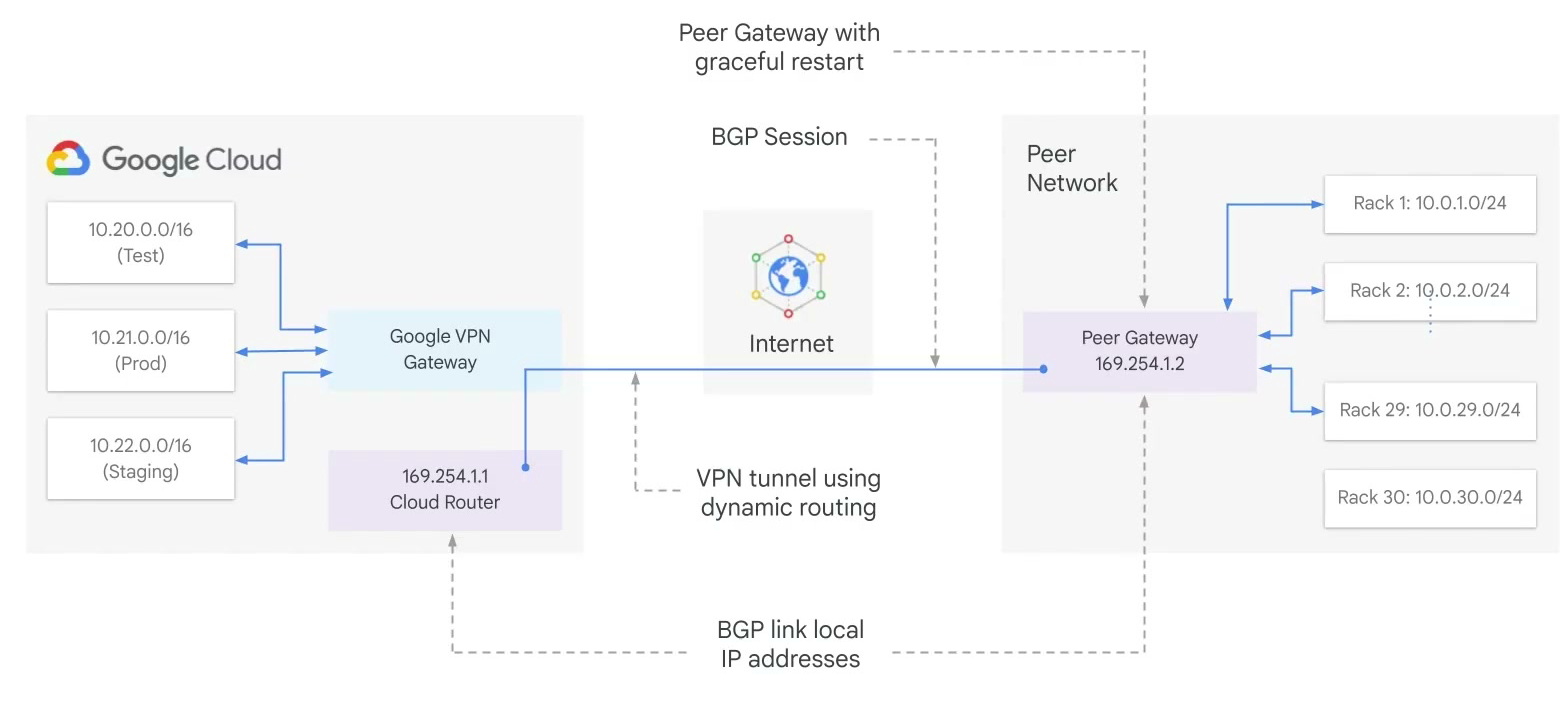
Cloud Router manages a VPN tunnel's routes with BGP, so routes are updated and exchanged without changing the tunnel configuration. When you add a new subnet on either side (for example a new Staging subnet in Google Cloud, or a new 10.0.30.0/24 subnet on-premises), it is advertised automatically and instances can send/receive traffic immediately. The peer gateway must support BGP.
To set up BGP, each end of the tunnel gets an extra link-local IP from 169.254.0.0/16. These addresses belong to neither network and exist solely to establish the BGP session.
Recap
| Classic VPN | HA VPN | |
|---|---|---|
| SLA | 99.9% | 99.99% (two/four tunnels) |
| Interfaces | One | Two (two auto-assigned external IPs) |
| Routing | Static or dynamic (BGP) | Dynamic (BGP) only |
| Redundancy | Single tunnel per gateway | Two-tunnel / multi-topology |
| Status | Legacy (pre-HA gateways) | Recommended for new deployments |